
Get Money By Ask Question

Get money by ask question to another people is possible. It can be done via Pickjack. Pickjack is a website that will give some money to people who join them answer questions and then make question on that site. More question more money you got.
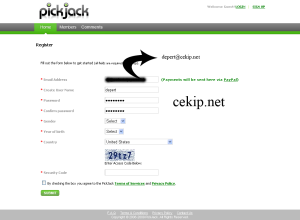
Now, what should we do to join them. It is easy. First, go to their website using this link and register. After that fill the form. You have to remember the email that you used must be register in paypal too. Because they will send your money via paypal.

Get Money By Ask Question


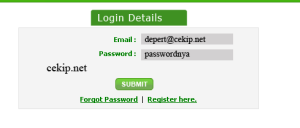
If you have complete fill the form click submit. Then open your email that you use for register. Click link activate that they send to you. Next step, login to your account in pickjact by fill your email and password in input box.
Get Money By Ask Question


Now, you can answer and make questions. Remember, to make one question you have answer 20 question correctly first.
Get money by ask question on pickjack.

Picture from depratama.wordpress.com


Popular posts from this blog

Privacy Policy

Another Pratama Privacy Statement What follows is the Privacy Statement for all Another Pratama websites (a.k.a. blogs) including all the websites run under the computer.pratama.us domain. Please read this statement regarding our blogs. If you have questions please ask us via our contact form. Email Addresses You may choose to add your email address to our contact list via the forms on our websites. We agree that we will never share you email with any third party and that we will remove your email at your request. We don’t currently send advertising via email, but in the future our email may contain advertisements and we may send dedicated email messages from our advertisers without revealing your email addresses to them. If you have any problem removing your email address please contact us via our contact form. Ownership of Information Another Pratama is the sole owner of any information collected on our websites. Comments/Message Boards Most Another Pratama websites contain com...

Extend a LVM partition after increasing its virtual disk on Virtualbox

No Linux machine at work? the easy way could be to simply install Virtualbox in one of the PC, create a VDI and install Ubuntu 14.04 in it. But the day will come when you need more space! Here is how to resize it: Resize Virtualbox VDI Open Virtualbox, make sure to shutdown your virtual machine. Then open a terminal (here windows): 1 2 3 4 cd “ C : \ Program Files \ Oracle \ VirtualBox ” VBoxManage list vms VBoxManage clonehd uuid 0000000000000000 backup . vdi VBoxManage modifyhd uuid 0000000000000000 -- resize 204800 This is the Virtualbox official manual  of available commands. And  this is a website  to convert Gb into Mb (–resize takes Mb as input, 200Gb = 204800Mb). Boot Gparted to resize the partition After a default install of Ubuntu Server on one physical disk, you will have a SWAP partition, and then an extended partition in which you’ll have your LVM partition (So 3 partitions).  Download Gparted  .iso,...

Google Search Result Can Be Changed by User

Do you know? Now you can change the Google Search Result. Google invite users to change the Google search results as you wish. Want to raise the ranking of search results or remove it. How it works? It can be done through a feature called SearchWiki. Features change the results of this search can be accessed by users who have an account at Google. However, not all users can enjoy the services that are gradually spread. Through Google Read More